Microsoft Teams Enterprise Update – November 2026
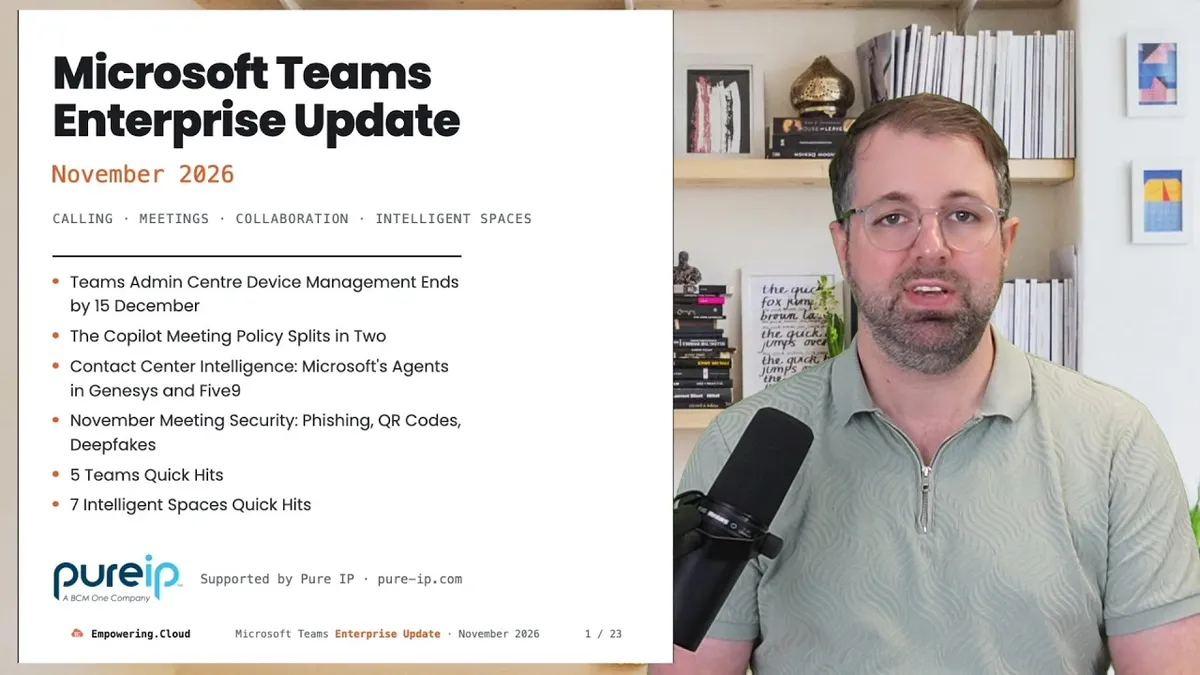
We are just pre-Microsoft Ignite, but there is still a lot going on, particularly in contact centre: Microsoft has launched Contact Center Intelligence, putting its voice agents inside Genesys, Five9, Avaya and Webex without a rip and replace. Also this month: the Copilot meeting policy splits in two, a Teams security batch covering phishing, QR codes and deepfakes, and the Teams Admin Centre device-management deadline now has dates per device type, ending 15 December. Plus 5 Teams quick hits and 7 intelligent spaces quick hits.
Many thanks to Pure IP, this month's benefactor.
Watch on YouTube · Full deck: teams-update-nov-2026.vercel.app
There is a second, separate video this month on Copilot credits — what switches on by default on 1 December. That one was worth a dedicated video; link to follow once it is live.
In This Video
- Teams Admin Centre device management ends by 15 December
- Thanks to Pure IP — Observability, 7 December webinar
- New on Empowering.Cloud
- Upcoming events — Ignite, Fireside Chat live from Ignite, Devices AMAs
- The Copilot meeting policy splits in two
- Contact Center Intelligence — Microsoft's agents in Genesys and Five9
- November meeting security — phishing, QR codes, deepfakes
- 5 Teams Quick Hits
- 7 Intelligent Spaces Quick Hits
Teams Admin Centre Device Management Ends by 15 December
I have been talking about this month after month, so you must know by now: device management for Teams Rooms on Android, Teams phones, panels and SIP phones is moving from the Teams Admin Centre to the Pro Management Portal, and it is now dated per device type. SIP phones, Teams Rooms on Android and panels move mid to end November; phones early to 15 December; GCC High and DoD by 15 December (MC1448373). GCC follows by 30 January 2027 (MC1227622).
If you have not looked already:
- Read the Message Center posts and make sure every device is up to date. Microsoft pushes the Admin Agent update to online devices; offline or end-of-support devices may become unmanageable, and every device needs one sign-in to onboard (MC1450126).
- Run the readiness checks — WebSocket inspection, proxy authentication, NAT pool exhaustion — from the Mission Critical blog.
- Make sure your operational teams have access to the Pro Management Portal and can manage those devices there.
- Rooms on Windows app updates are now Pro Management Portal only, not the Microsoft Store (Teams Rooms release notes).
Thanks to This Month's Benefactor — Pure IP
Many thanks to Pure IP, this month's benefactor — I really appreciate all their support. Pure IP recently launched Pure IP Observability, which gives complete coverage of their core network as well as the UCaaS platforms on top of it — Teams, Webex and Zoom — pulling in the CDR and quality data from each and combining it into unified reports that include the network and the operator leg. I did a video with Diana Florea talking through it.
They also have a webinar coming up: What's Next for Pure IP, 7 December, 4pm UK, with Adnon Dow, Chief Product Officer, and Diana Florea on the 2027 portfolio — voice-network intelligence, AI voice traffic and fraud detection. We have talked a couple of times about AI voice agents; that is coming too. If you are interested, do join.
Fresh on Empowering.Cloud
If you have not been on Empowering.Cloud yet this month, there has been a lot going on, including some really good podcasts:
- Tristan Gayford, EY — running Teams for 400,000 people in 100 countries. I really enjoyed this one: Teams at massive scale, how you deal with deployment, from someone who has been in the community a long time. Watch / listen
- Henry Levak, VP and GM, Logitech — the biggest rooms launch: Rally Bar 2, Rally System 2 Pro, Link and Sound Shape. Henry gave us the inside track on the development, the features, the timelines and the MDEP conversation. Watch / listen
- Logitech's new Teams Rooms explained in ten minutes, with Vivek Sekar. Watch
- Beyond compliance — AI call-recording insights for Teams, with AudioCodes and Colt. Watch
- Teams-certified Contact Centre Face-Off — five vendors, five minutes each, back to back. Over 240 people on the live session and a lot of interest in the recording. We are planning more versus sessions, devices next. Watch
- Tom Crinnegan, EY — scaling Microsoft 365 Copilot over 400,000 users. Watch / listen
Upcoming Events
The big one is Microsoft Ignite. I will be there with interviews and conversations lined up — if you are there, let me know, it would be great to say hello.
- Teams Rooms AV Jargon Explained, with Shure's Josh Blalock · 11 November — fellow MVP Josh on the AV terminology that aligns to Teams Rooms, explained for the IT pro.
- The AI Bill Nobody Warned You About — consumption billing, with Orchestry · 12 November — usage-based billing is a big conversation as Code rolls out, Cowork is out and Autopilot is on the way: how you manage it, how you control it.
- EMEA Teams Devices Ask Me Anything · 18 November, and APAC · 24 November.
- Teams Fireside Chat — Live from Microsoft Ignite, with Scott Plette, Microsoft · 19 November — Scott joins remotely to cover the news.
- Deepfake Calling Fraud — How Do You Protect Yourself? · 3 December, with Ribbon — deepfakes are a big conversation in this space right now, as you will see below.
- In person: Microsoft Ignite · 17–20 November, San Francisco, with the Ignite M365 Message Center User Group on 16 November.
- In person: UC User Group London · 3 December, kindly hosted by Neat — a round-up of the year, a look at what is coming on the roadmap, and drinks afterwards.
The Copilot Meeting Policy Splits in Two
Microsoft keeps tweaking the policies and controls around Copilot in meetings, recording and transcription, so this one is worth reading. The Copilot meeting policy becomes MeetingAI and TranscriptionWithMeetingAI, with new "Who can manage AI", "Who can use AI" and "Start Transcription with AI" options; existing settings map across automatically (MC1532253 · Roadmap 577399). Targeted Release mid-November, GA late November to early December. Check what the auto-mapping does to any customised policies before GA.
- Recording and transcription options now follow the organiser's policy, with a new "Record only" choice (MC1508234).
- For Teams Premium, default meeting templates can apply protection settings to every meeting scheduled from Teams or Outlook, rolling out early to mid November (MC1526679).
- Two slips to 2027: the AI meeting memory files we talked about last month (MC1429018) and Facilitator in channel meetings (MC1461165).
Contact Center Intelligence: Microsoft's Agents in Genesys and Five9
This is probably the biggest news this month. Microsoft Contact Center Intelligence is in public preview from 21 October. The idea: take Microsoft's voice agent technology and integrate it with the contact centre you already have — Genesys, Five9, Webex, Avaya — without ripping and replacing it. In Microsoft's words, it "complements the systems already used for telephony, routing, queues" (Dynamics 365 blog). It hands off to humans "through the contact center or even Microsoft Teams", there is a 30-day trial, and it is billed in Copilot Credits (Learn).
Early days, and there will be more on this at Microsoft Ignite. Same day, Microsoft also introduced the customer conversation harness in Copilot Studio — buy numbers in Studio and "escalate incoming calls to a Teams queue". And for the first time Microsoft is in the Gartner Magic Quadrant for CCaaS, as a Visionary (blog, 22 October).
That makes five doors into AI voice in and around Teams, all on one meter (my framing): Teams Phone Agent, the Copilot Studio harness, Teams Phone Agent plus a certified contact centre through Unify, Dynamics 365 Contact Center, and now Contact Center Intelligence. Lots going on just in the Microsoft ecosystem around voice agents.
November Meeting Security: Phishing, QR Codes, Deepfakes
Microsoft continues to have a big focus on security, and that includes the Teams team. A lot of work has landed around phishing, QR codes and deepfakes:
- AI phishing detection in chat, external first-contact first: Targeted Release November, GA December, nothing to configure (MC1519866 · Roadmap 575288).
- Malicious QR detection. Last month it was hiding the QR code behind a click-through; now Teams checks the URL in near real time, November (MC1526651). Also impersonation warnings in meetings, mid-December (MC1530613), and reporting suspicious guest invitations, November (MC1530615).
- Third-party deepfake detection now has a Message Center post: Targeted Release mid to late November, GA to be confirmed; you pick a certified provider in the Teams admin centre (MC1509787). I still have not heard who the certified partners will be — listen out for that at Ignite.
- Granular Conditional Access for meetings, preview late November, GA January (MC1532256).
- Facilitator gets a "protection skill" on the roadmap for November 2027 — the idea is Facilitator watches the transcript for anything that looks like phishing or someone trying to do something they should not in a meeting (Roadmap 573450). Nice to see the meeting AI used for security as well as for transcription and actions.
5 Teams Quick Hits
- External chat file sharing on by default. From a user experience point of view this is good: you can now drag files into a federated chat and it generates a OneDrive link. Tenants that never set the policy get it switched on; set it "by the first week of November" to keep it off, rollout date to be announced (MC1479514). A reminder though: Teams federation is being used a lot for impersonation attempts, bad actors posing as IT support. As much as I love open federation, an external allow list is probably best practice now — Tony Redmond has a good post on the report that 30% of monitored organisations saw an attempt (Office 365 for IT Pros, 28 October).
- New meeting controls roll out. The meeting controls shift to the centre of the screen, Leave is isolated on the right, Raise Hand sits under React, and recording and transcription are separate buttons (What's New in Teams, August–September). I recently had Michelle Maislen, the Microsoft PM who owns this, on the podcast — two opt-in prompts before auto-migration, and misclicks down by more than half. That episode is out soon.
- Two cancellations and two slips. Copilot stays in the Teams chat list after all (MC1479502) and channel Whiteboards stay in the user's OneDrive (MC1253753). Slipped to January 2027: IntelliFrame people labels on Rooms on Windows (MC1419798) — I have my Huddly system ready to test the hover-over labels — and Teams retention policies no longer covering Copilot (MC1481313).
- Call delegation, Phone Agent updates, Premium trial clock. Intelligent Call Delegation is your personal attendant that screens your calls, with personal attendant policies; preview mid-November, GA January 2027 (MC1519860). Teams Phone Agent is up to 42 voices, has a Copilot Credit Estimator and a spam-detection template, and is not supported in India (Learn changelog). And the Queues app Teams Premium trial is still available — redeem by 14 December, and if you go on to buy, the first year is discounted (MC1471792).
- Two screen shares, side conversations, quality insights. Two simultaneous screen shares, on by default, late November to mid December (MC1528014 · Roadmap 80239) — the request you see from game studios and pair programmers — and Teams Rooms on Windows (Pro) show both shares side by side with a layout per display, GA December (Roadmap 579184). Side conversations during meetings — a 1:1 or small-group chat from inside a meeting without disrupting it — is on the roadmap for December (Roadmap 573156); not sure what the UI will look like yet. And AI meeting-quality insights land in the Teams admin centre mid-November (MC1523077) — I am all for AI reasoning over that data to help us understand issues.
7 Intelligent Spaces Quick Hits
- Teams Rooms join Zoom meetings: Cross-Platform Meeting Connect. Bit of a mouthful, but it is the feature set people want between the two systems: HDMI share, roster, read-only chat, synced mute and end-call, and 1080p for Teams meetings on Zoom Rooms. No Microsoft dates; Zoom says first half of 2027 (Teams blog, 20 October · Zoomtopia).
- Logitech lands on MDEP. "Logitech Rally Bar 2, Tap IP 2, and Tap Scheduler 2 are rolling out globally now" (MDEP blog, 8 October); Rally System 2 Pro and Rally Speaker 2 Pro follow, with Logitech Link and Sound Shape audio. For the inside track, including the design philosophy, check out the podcast with Henry Levak above.
- "Turn off IntelliFrame" goes away for online participants. The option is retired for online participants in Cloud IntelliFrame rooms from late November, worldwide by early January; in-room users can still change it from the console (MC1521614). It feels like the focus is on edge AI for framing now. Express face enrolment and people labels have slipped to January 2027 (MC1419798), so if you were waiting on that one, you will be waiting a little longer.
- Rooms on Android: green-room chat, October build fixes. Pro-licensed Rooms on Android get the private presenter and organiser chat in green-room meetings and events, mid to late November (MC1519857), and the October build fixes the console stuck on "connecting" and the missing incoming-call UI (Teams Rooms release notes).
- Rooms on Windows: in-person Facilitator notes, PMP-only updates. Facilitator AI notes for in-person meetings on Rooms on Windows (Pro), one tap from the console, is on the roadmap for the first time (Roadmap 560318). Build 5.7.112.0 adds local PTZ control, and app updates are now "distributed exclusively through Pro Management Portal", not the Microsoft Store (Teams Rooms release notes).
- Panels, desks and a Canadian time zone. Hide organiser names on Teams panels is rolling out (Roadmap 569423); desk analytics slips (MC1490906). If any part of your organisation is in Canada: permanent daylight saving from 1 November means Teams Android devices need a firmware update or a temporary time zone in the portal, and Shifts needs a closest-city check (MC1528027 · MC1532245).
- Free Teams Rooms Fundamentals course from AVIXA and Microsoft. Strongly recommend you check this out: Jimmy Vaughan and the team have built Microsoft Teams Rooms Fundamentals, module 1 of the Microsoft Learning Experience — planning and design for Teams Rooms, free, self-paced, about three hours. You need a free AVIXA account to log in. Early feedback is good and I will be working through it myself.
Thanks, and See You at Ignite
That is it for this month. I will be at Ignite bringing you the Teams news and some Copilot news too — if you are there, come and say hello. Look out for the separate Copilot credits video. Many thanks again to Pure IP, this month's benefactor, and do join their What's Next for Pure IP webinar on 7 December. The M365 Perspective newsletter has every link, and events.empowering.cloud has everything coming up. Questions, comments and feedback welcome below.
Comments ()