The New Copilot Explained: Home, Code and Autopilot, and what it means for Microsoft 365 admins
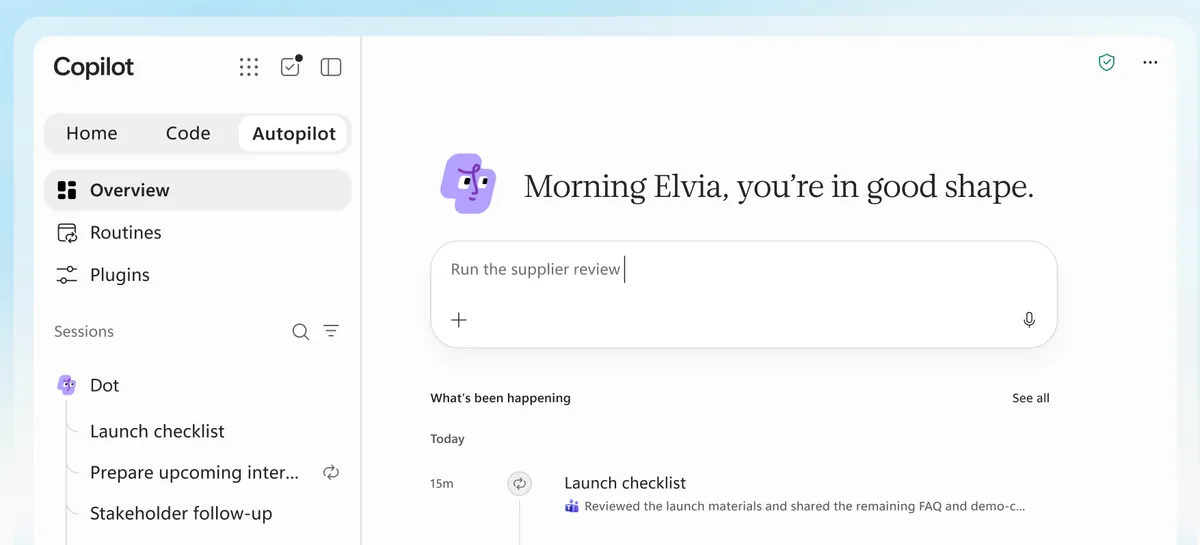
Microsoft announced "the new Copilot" on 25 September: one app, three tabs, Home, Code and Autopilot, and more clarity on the pricing model.
Jared Spataro's post on the Official Microsoft Blog, Introducing the new Copilot with Home, Code and Autopilot, landed on Friday morning after a private customer event in Seattle on Wednesday where Satya Nadella, Jacob Andreou and Charles Lamanna walked "a few dozen" leaders through it.
Microsoft says that "coming soon" you will not need to choose a mode at all: describe the outcome and Copilot routes it to Chat, Cowork or Code. That routing is a promise, not a feature, and I would treat it as such until it ships.
The app itself will be a new version of the Microsoft Copilot app you already have. That is the one that was renamed from the Microsoft 365 Copilot app in August (MC1454108) and merged with the consumer Copilot install.
Home: Chat and Cowork in one place, with Office inside
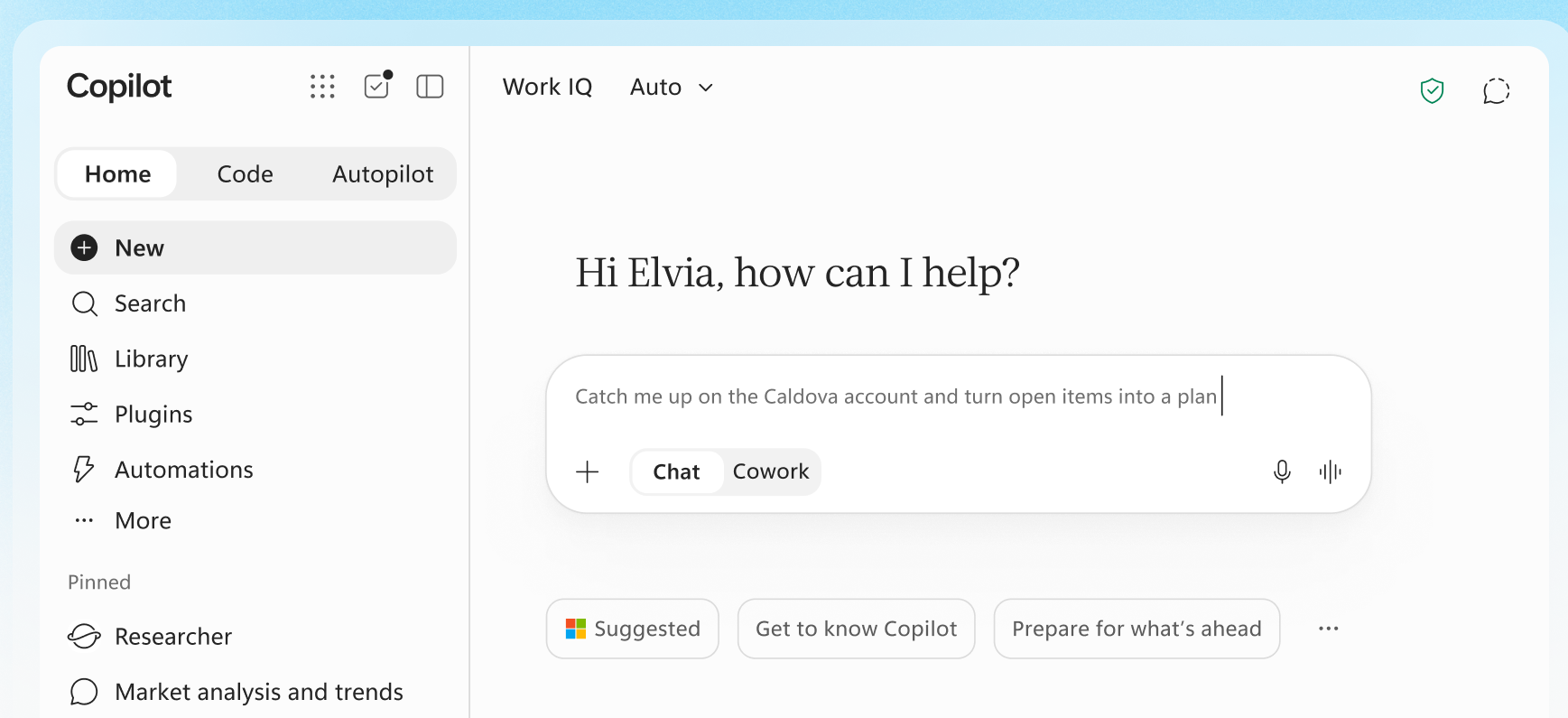
Home is the new landing tab. It combines Chat and Cowork. Chat is for quick questions and drafts; Cowork is for longer-running, agentic work you hand off end to end (Microsoft's examples are an RFP response, a launch kit, a financial close package). Chat will still be included, and Cowork will be usage-based billing; more details on that below.
The launch Message Center post, MC1479277, says Home reaches Frontier in October for everyone with the Copilot app, and that the left navigation changes with it: Plugins replaces the Agents entry point in Chat and Customize in Cowork, Automations moves out of Cowork into the Home nav, and a Library item lists your recent Word, Excel and PowerPoint files.
Chat itself is getting bigger. Per the same MC, "Chat can complete long-running, multi-step knowledge work, including drafting email, managing meetings, working in Teams, managing OneDrive and SharePoint files, finding people, and creating Word, PowerPoint, Excel, PDF, and HTML files. Sensitive actions require user approval." That lands in Frontier later this month, is included with the Microsoft 365 Copilot licence, and shows up in a new Tasks view. So the line between Chat (included) and Cowork (metered) is not as clean as the blog makes it sound.
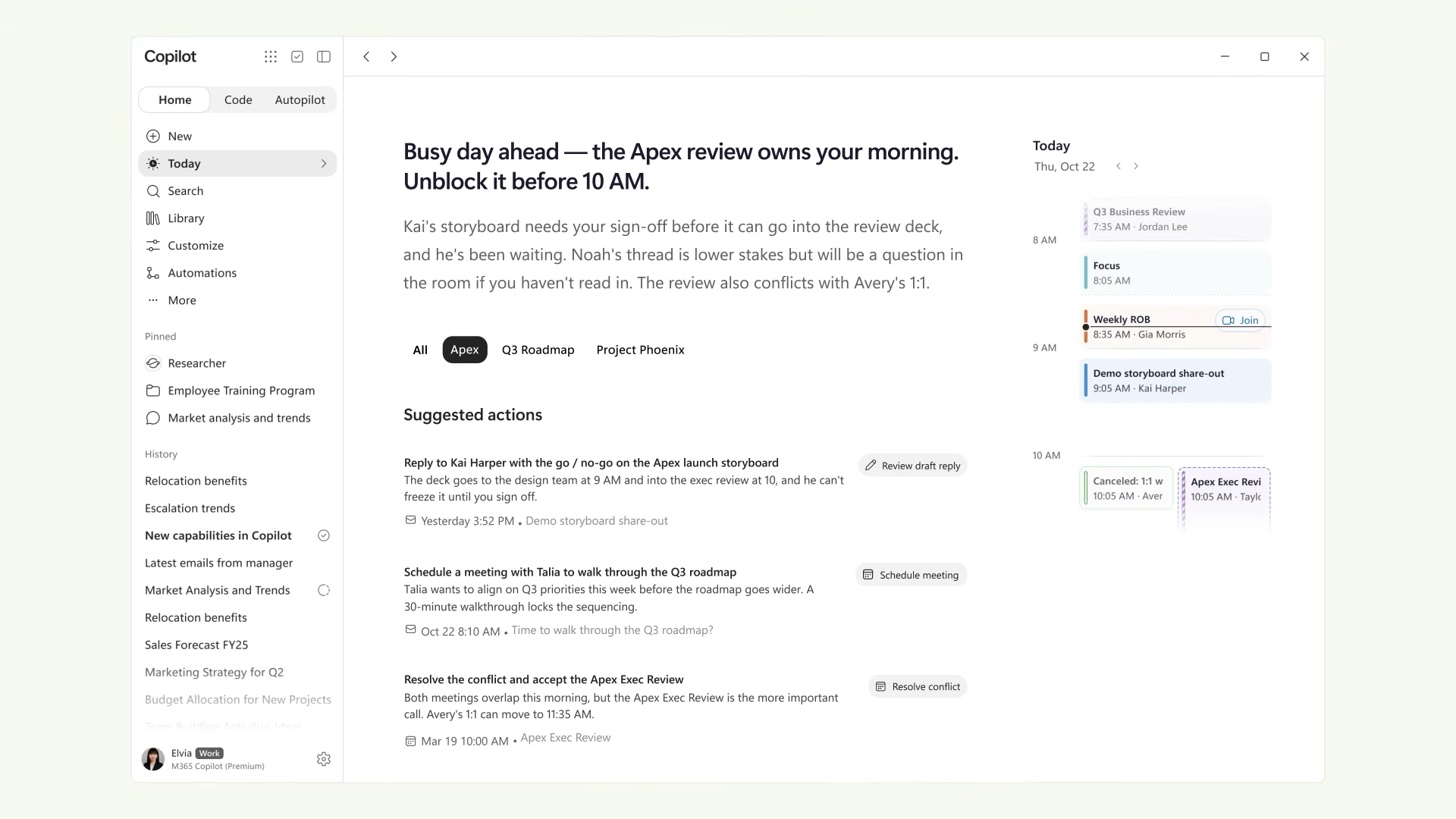
We also got a sneak peak of a new feature. "Coming soon in Home, Today is a proactive, personalized command center across mail, calendar, Teams threads, meetings and tasks… Today enters private preview in October in Copilot, and will be coming to Outlook and Teams as well."
Office (Web Apps?) in Copilot
"The full power of Word, Excel and PowerPoint" built into the Copilot app, Microsoft said at the launch. From Home you ask Copilot to "draft a launch brief, model a budget, build a deck, or pick up a file your team is already working on, and it creates or updates a real, editable document, workbook or presentation — live for your whole team, not just you." You refine it beside the conversation, @mention a teammate and their edits appear as they make them, and "things stay in sync between Copilot and the Office apps."
My guess is this is the web Office editor embedded in the Copilot shell, because "live for your whole team" and real-time co-authoring is what the web editors already do.
Licensing, per MC1479277: used through Chat, Office in Copilot is included in the licence; used through Cowork, it is usage-based billing. It reaches Frontier later this month.
Code: app creation for everyone, hosted in your tenant on the new Copilot Managed Runtime
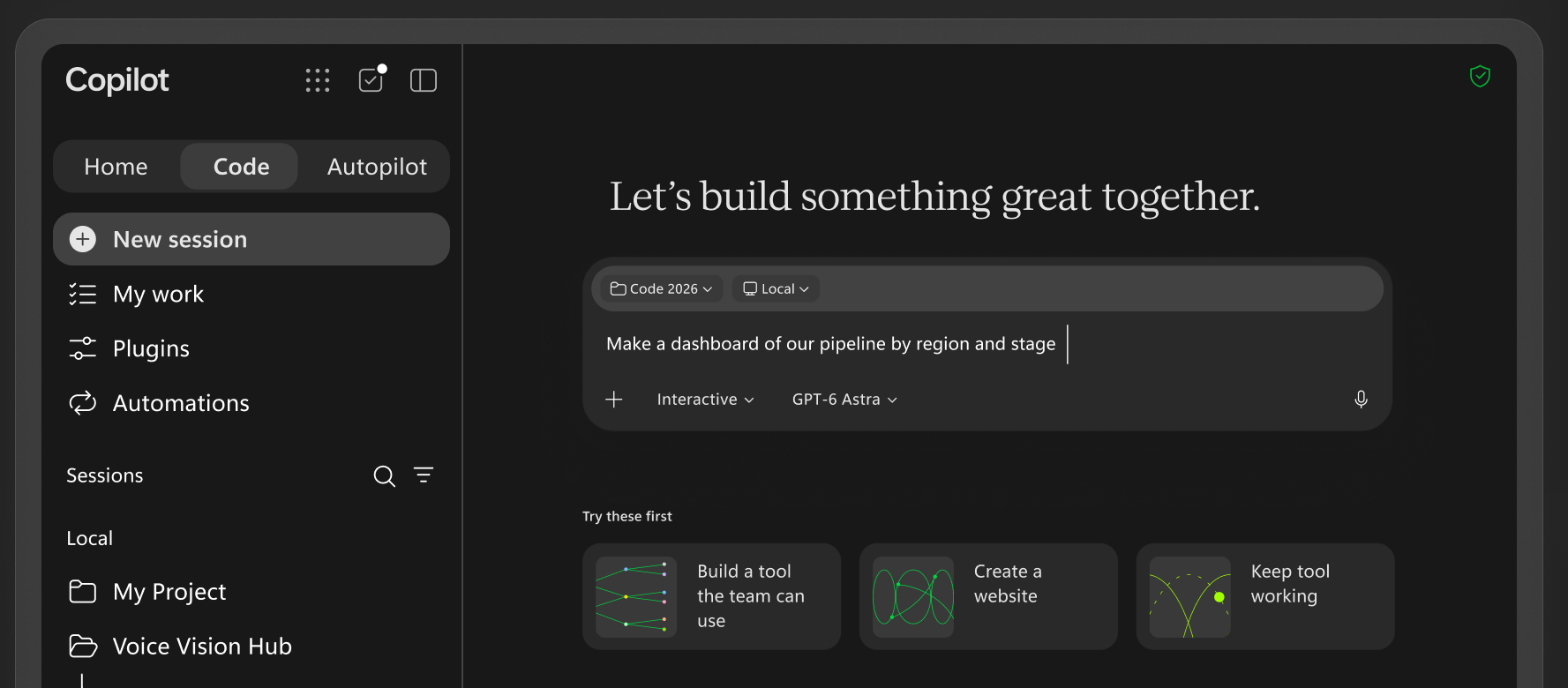
Code is new. It's not coding in the same way you might with GitHub Copilot, or in the way ChatGPT has merged in Codex or Claude has merged in Claude Code.
Describe "an app, tracker, dashboard, automation or workflow in natural language, and Copilot chooses an approach and builds it", from desktop widgets to dashboards to cloud-hosted internal apps you share with your team.
It runs on "the same underlying technology as GitHub Copilot", in a sandbox, and the apps are hosted inside your Microsoft 365 boundary on the new Copilot Managed Runtime, which is in public preview now. The runtime has an SDK and CLI so pro-code tools can deploy into it too; Lovable is the launch partner quoted.
Code is usage-based billing: eligible users need a Microsoft 365 Copilot licence and a spending policy, and it reaches Frontier later this month (MC1479277).
Jack Rowbotham, Microsoft, explains this as:
Security and governance as the foundation:
▪️Microsoft Entra identity provides authorized access.
▪️Organizational policies govern the connectors, data and endpoints apps can use.
▪️Automatic version and source control via Git enables true developer workflows and co-development.
▪️Connectors and Work IQ are integrated, making it easier to access the products and data you need.
📊 View, manage and govern apps in a single place. Every app shows up in a new Apps experience in the Microsoft 365 admin center, with access, usage, health and policy in one place.
Microsoft's answer to the obvious question is on record, via Foley: "Copilot Code does not replace Power Apps or Power Automate... they begin from different development models and support different workflows.". Jukka Niiranen's piece on Managed Apps from earlier this month is the companion read on where the Power Platform sits now.
Autopilot: Microsoft's Cloud OpenClaw (Private Preview)
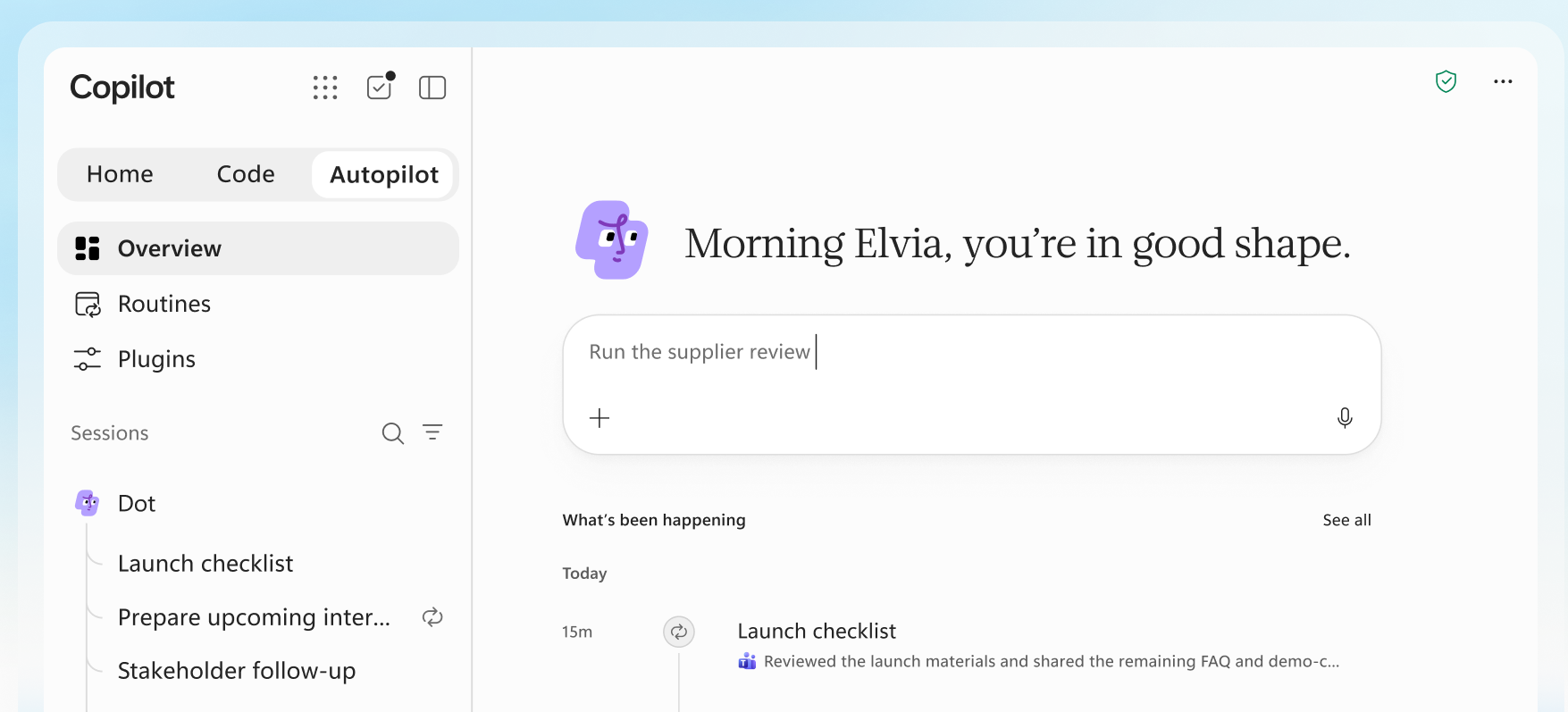
Autopilot is Scout with a new name, but it doesn't run on a local machine. It is "a persistent, proactive and personal agent that keeps working even when you're not": give it a name, a role and a goal, and it watches channels, follows up on threads, runs recurring work and "picks a project back up days later". It is cloud-hosted and "lives in your tenant with its own identity, memory, computer and workspace", and you @mention it in Teams or Outlook like a colleague. Microsoft's demo was an Autopilot called Dot running Black Friday stock across 18 retail stores.
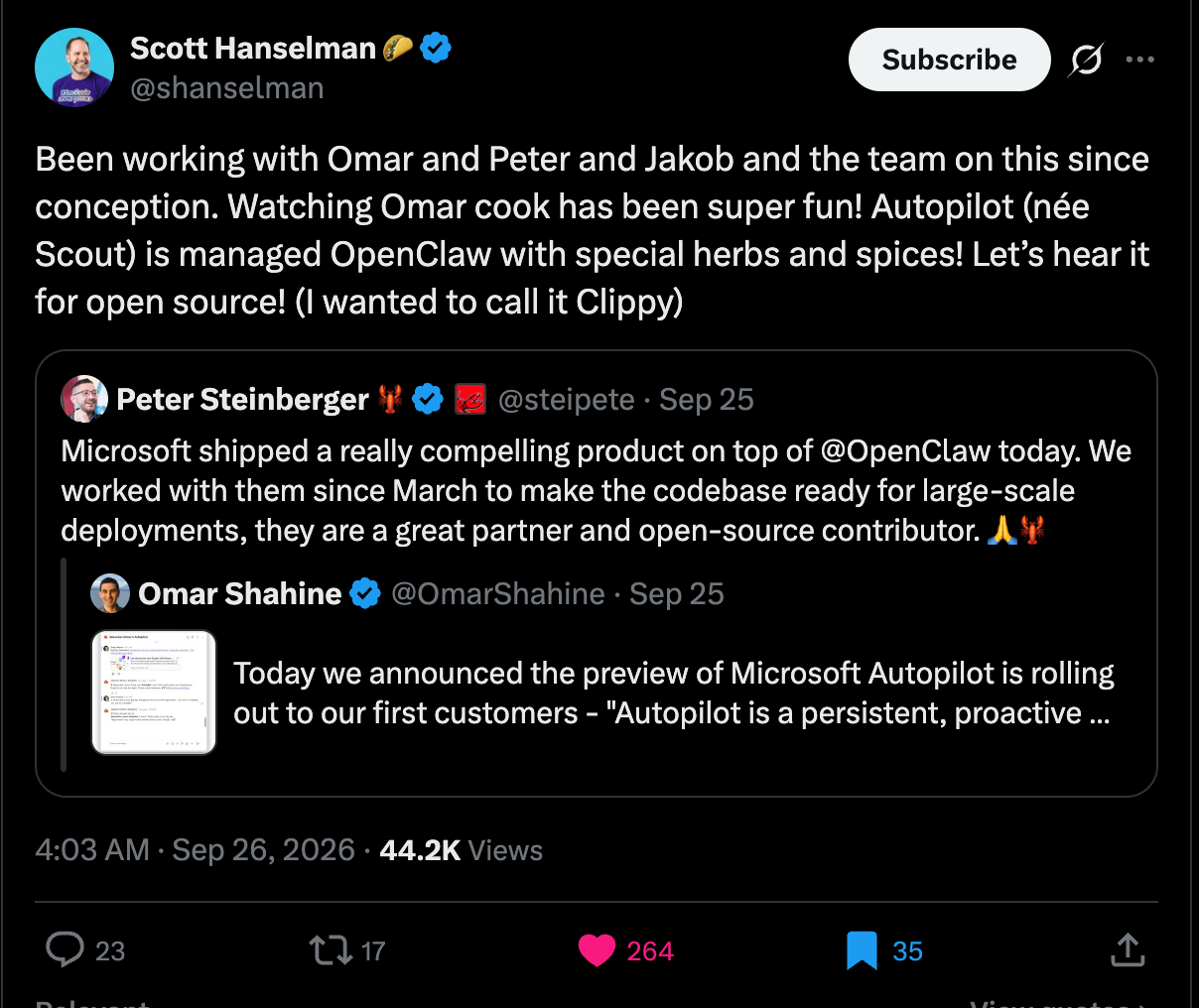
Autopilot is "managed OpenClaw with special herbs and spices". OpenClaw Foundation's own post quotes Omar Shahine, who leads the Autopilot team: "We are building Autopilot on @openclaw... to make it a fantastic enterprise-grade runtime." Nadella told Alex Heath it runs on "a hardened version of OpenClaw".
Given that in March Nadella was calling OpenClaw-style agents "absolutely terrifying to an IT admin" (Andreou repeated the line at the event), the whole pitch here is that the terrifying bit has been wrapped in Entra identity, Agent 365 permissions and audit.
If you piloted Scout, there is a Message Center post for you: MC1479273, "Looking ahead: Microsoft Scout desktop app", published 25 September. Autopilot "will expand in private preview on 9/30, with broad availability by end of year"; the Scout desktop app moves into maintenance mode the same day with "no additional capabilities added".
On wider rollout and admin controls, MC1479277 says only: "We will update this message with rollout timing and admin control details when available."
@Copilot in Teams gets an upgrade
"And now when you invoke @Copilot in Teams, your entire team gets the shared context and permissions of the channel, group chat or meeting.
Ask why a product decision was made, and Copilot pulls the background from across conversations — no digging, no re-explaining. When that decision ripples into manufacturing, packaging and launch timing, Copilot goes further: it offers to prepare a cross-functional review with dependencies, owners, open questions and decisions, so everyone can see how their work connects and what still needs resolving.
The team stays aligned and the project keeps moving forward. The @Copilot capability will be in private preview in Teams by the end of the month." I'll be looking out for more details.
Copilot Super app - What is actually shipping, and when
Nadella promised the super app "this quarter" on the July earnings call. The quarter ends on 30 September, and the announcement met it with five days to spare. However, we have a way to go for general availability:
- Home: rolling out through the Frontier programme in October (MC1479277); Code reaches Frontier "at the end of the month", broad availability "in the coming weeks" after that.
- Autopilot: private preview expanding at the end of September.
- Office in Copilot: consumers and Frontier "in the coming weeks".
- Today: private preview in October.
- @Copilot in Teams: private preview by end of September.
- Copilot Managed Runtime: public preview now.
- Plugin registry: GA in the coming weeks.
- Code for Microsoft 365 Premium and Pro (consumer) subscribers: preview "later this year".
- Copilot in SharePoint and OneDrive: general availability rolling out later this month (MC1479277).
- Copilot Notebooks: task delegation, full Office editing and collaboration, HTML reports, model selection and a refreshed design, Frontier later this month (MC1479277).
Frontier is the gate for most features. It is a tenant-level opt-in at Microsoft 365 admin centre, Copilot, Settings, Copilot Frontier, with No access / All users / Specific users. Frontier features come with no HIPAA Business Associate Agreement and no standard SLA (Get started with the Frontier program). Since that document, Cowork can now be enabled without a dependency on the Anthropic model family.
Microsoft published the Message Center posts the same day: MC1479277 "New ways to work across Microsoft Copilot and Microsoft 365" for the launch, and MC1479276 for the pricing model and FinOps. Neither had reached the public MC mirrors when I checked. There is no roadmap item yet apart from 501451 (Copilot in SharePoint) and no Copilot release-notes entry.
We are not far from Microsoft Ignite, 17 to 20 November; I expect we will see and hear more then. I will be there to gather and share the latest information.
Copilot Pricing Model: User Subscription plus Usage-Based Billing
The companion post that matters most for anyone who owns a budget is Nicole Herskowitz's Evolution of the Copilot pricing model.
Two Terms:
- Copilot User Subscription License (USL) - seat license
- Usage-Based Billing (UBB) - Microsoft's term for consumption billing
The User Subscription License, still $30 per user per month list, for enterprise covers what Microsoft call "everyday AI": Chat, Copilot in Word, Excel, PowerPoint, Outlook and Teams, Office in Copilot, and model choice.
GPT-5.6 and Sonnet 5 are included; "new models like Opus 5 will be included with limits". Fair use applies, and when a heavy user hits the limit, they get "a clear warning first, then a choice: switch your model selection to Auto at no additional cost or move to credits." No numbers for those limits have been published.
Usage-based billing in Copilot Credits covers "Advanced AI": Cowork, Code, Autopilot, "new advanced experiences in apps like SharePoint" (some initial definition of these here), and use of the frontier models, Astra and Fable. UBB requires the USL underneath it. MC1479277 puts a first definition on the SharePoint line: the everyday Copilot in SharePoint and OneDrive features stay on the licence at GA, and "new agentic capabilities and the ability to work at greater scale" are what go on credits.
Copilot in SharePoint and OneDrive go generally available later this month (MC1479277). The everyday features from the preview stay on the licence; the agentic work and "the ability to work at greater scale than was possible in preview" consume credits, controlled under Copilot > Cost Management. If you opted out of the SharePoint preview with PowerShell, that is honoured only until 1 November; after that, availability is managed through SharePoint site AI settings.
Microsoft takes a shot at OpenAI and Anthropic's enterprise plans in the post "Some vendors put everyday AI work on a meter. We think that's the wrong deal, because when every task has a meter, companies may ration access and only some people get to use AI."
Microsoft's Example Costs
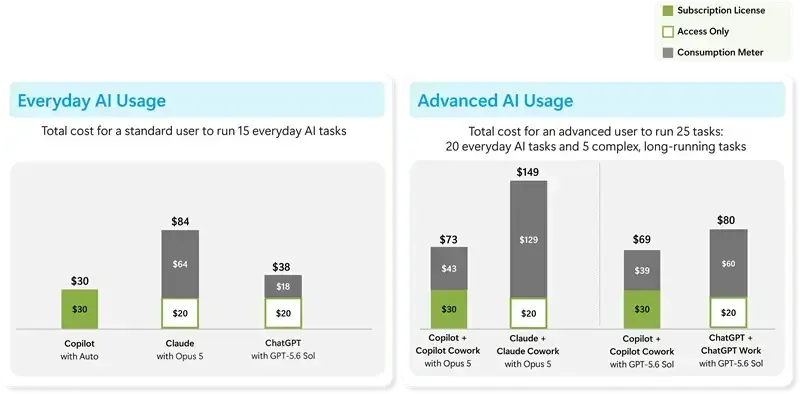
The blog post gives some examples of anticipated user costs depending on usage.
A number nobody has is the one you need: what Code and Autopilot actually burn per task. There are no published credit rates for either, none for Managed Runtime hosting.
Microsoft UBB documentation here.
FinOps: Managing Usage-Based Billing (UBB)
The good news for admins is the default. "UBB services stay off until an admin creates a spending policy in the Microsoft 365 admin center, and nothing is billed before that." blog. Though interestingly, for new Microsoft 365 Copilot Business purchases, standalone or bundled, it looks like UBB will be enabled automatically, with some kind of to-be-defined limit; see MC1476200.
Spending policies set budgets at tenant and group level with per-user caps, alerts at thresholds, and a choice of what happens at the limit (warn, let the user request more, or say nothing). Spend can be mapped to Azure subscriptions or resource groups, and reporting breaks out by user, group, workload, policy and payment method.
New on 25 September (FinOps for AI post): cost management in Agent 365 now covers Code and Managed Runtime alongside Cowork and the Work IQ APIs, with Copilot Studio agents added in October; admins can restrict which model families a group can use, starting in Cowork, and those restrictions also shape what Auto is allowed to pick; a Cowork consumption dashboard shows which scenarios burn credits and what they produced; spending policies have a Graph API; and end users can see their own credit usage, balance and history inside Copilot.
The pricing Message Center post, MC1479276, adds the dates and a few controls the blog leaves out: "UBB will begin to roll out in Copilot in Q4 CY2026" and is switched on inside the Frontier public preview; spending policies can assign "models and effort levels by group", including which models Auto may pick in Cowork; admins can now edit the billing method on an existing spend policy; and end-user credit visibility is generally available in September while the rest of the FinOps set is preview.
One gotcha to watch for: the "Auto-apply new services" option in a spending policy defaults to on, so a policy you set for Cowork will pick up Code and Autopilot as they arrive unless you say otherwise. Check that setting before the Frontier rollout reaches you.
The other October change is who sees what. From October (November for deferred tenants), the Cowork, Code and Autopilot entry points are visible by default to every licensed user, whether or not they can use them. A user without a spending policy gets an in-product message instead: "Request access" by default for enterprise, "Learn more" with no request option for education. A new admin centre setting picks the message and whether requests are allowed or blocked, and the existing "Allow users to discover and use AI experiences enabled by usage-based billing" setting is being removed (MC1479277). Decide your message before it lands.
Separately, the CSP channel gets usage-based billing switched on by default for new Copilot Business licences from 2 November, with a preset monthly limit (Partner Center announcements), so SMB tenants will start seeing metered spend unless their partner changes the default. MC1476200 adds that the same default applies to eligible new Copilot Business purchases made direct from Microsoft from 19 October; Microsoft creates the Azure resource and a spending policy with default limits, and leaves any existing policy alone.
Want to stay up to date as we find out more, Check out my Microsoft 365 Perspecitve newsletter here.
Comments ()