Microsoft Copilot Cowork Explained by Microsoft Experts - Use Cases, Pricing and Best Practices
Microsoft 365 Copilot Cowork hit GA on 16 June 2026, turning Copilot from assistant into digital colleague. Alev Tamer (Microsoft) and Femke Cornelissen (Wortell, MVP) cover the new models including Cowork 1, DLP and sensitivity label support, plugins, skills management and how Cowork differs from…
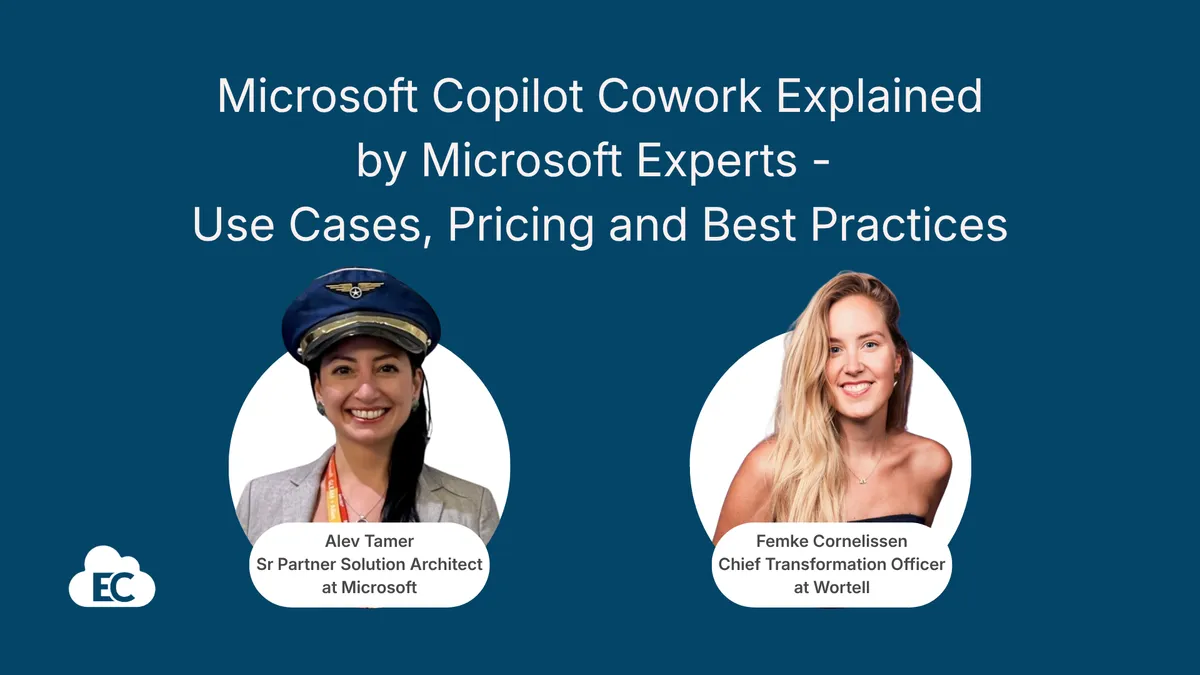
Alev Tamer of Microsoft and Wortell's Femke Cornelissen walk through Microsoft 365 Copilot Cowork, generally available from 16 June, covering how it differs from Copilot Chat and Microsoft Scout. The session covers the credit-based pricing model and admin cost controls, reusable skills, and live demos across finance, legal, sales and personal productivity.
Microsoft 365 Copilot Cowork: From Assistant to Digital Colleague - What You Need to Know
Microsoft 365 Copilot Cowork became generally available on June 16th, 2026, and it represents a genuine shift in how Copilot works. Rather than an assistant that answers questions, Cowork is designed to be a digital colleague that can execute multi-step tasks across your Microsoft 365 environment - drafting emails, building PowerPoint decks, updating spreadsheets, and coordinating across systems, all from a single prompt.
In our latest Insider Live session, Alev Tamer, Senior Partner Solution Architect at Microsoft, and Femke Cornelissen, Chief Transformation Officer at Wortell and Microsoft MVP, walked through what Cowork actually does, how the new pricing model works, and showed real demos of Cowork in action across finance, legal, sales and personal productivity scenarios.
Here's what you need to know.
Thanks to Alev and Femke for sharing their insights, demos and practical experience for this session.
Cowork Is Not Just a Chat - It's a Shift in How Copilot Works
The key distinction Femke made early in the session is worth repeating: Copilot has been an assistant - you ask a question, you get an answer. Cowork is a colleague. You delegate work to it.
"There is something changing in the way that we work with each other. It's not just our assistant anymore. It's actually really a colleague. It understands you even more, and it's going to do some work for you as well. That's way different than using chats in M365 Copilot."
- Femke Cornelissen, Wortell
Cowork can take a single prompt and execute a multi-step workflow: analyse a meeting transcript, draft a follow-up email, and create a PowerPoint presentation - all in one go. It works in the background, in the cloud, and you don't even need your laptop open.
Alev framed this as the third pattern of the Frontier Firm: human-led and agent-operated.
"You are the human. You are in control. We are now the third pattern of becoming the Frontier Firm, human-led and agent-operated."
- Alev Tamer, Microsoft
What's New in Copilot Cowork
The Cowork GA release came with several notable announcements:
New models available. Opus 4.8, Sonnet 4.6, and GPT-5.5 Deep Thinking are now available within Frontier. Cowork 1, a new model specifically trained on how people interact with Copilot, will be the most cost-efficient option. Note that for EU customers, Anthropic cloud models are being used as sub-processors - Alev mentioned details on timing are available under NDA through your Microsoft architect.
Security and compliance support. Cowork now supports DLP and DLM. When you create or upload documentation, you can select sensitivity labels from a drop-down. Everything operates within your Microsoft 365 environment with enterprise-grade security and compliance.
New plugins and connectors. LSEC, Miro, and Monday are already available. Databricks, CB Insights, and Canva are coming. Dynamics 365 Sales, Fabric IQ, Dynamics 365 ERP, and Dynamics 365 Customer Service are all accessible through Cowork - you just turn them on.
Skills management. A dedicated skills tab allows you to create, upload, and manage skills. You can even ask Cowork to create skills based on your day-to-day job. Skills from other AI tools, like Claude, can be migrated to Cowork too.
Browser use. With Edge, Cowork can now log into websites and interact with web content on your behalf.
Mobile availability. Cowork is available on mobile, so you can kick off tasks while travelling and have results waiting when you're back at your desk.
New UI. Cowork is now embedded in the new Microsoft 365 Copilot interface with easy switching between Chat and Cowork modes.
Microsoft Scout: Always-On Automation
Alev also clarified the distinction between Cowork and Microsoft Scout, which is an important one for planning.
With Microsoft 365 Copilot, you catch up with emails and create artefacts. With Cowork, you automate multi-step business processes across systems through prompts. Microsoft Scout takes this further - it's always-on, managing and coordinating without you needing to send a prompt at all.
Alev shared a practical example: he uses Scout to monitor how many offers his partners create on the Azure Marketplace. Scout creates a formatted deck of partner offers and updates it automatically every week.
"Think about a repetitive task that you do in your day-to-day life, and then just let either Cowork do on behalf of you, or you don't even need to do it. You can just create an automation in Scout."
- Alev Tamer, Microsoft
The New Pricing Model: Credits, Tasks, and Cost Management
This is the part that will require attention from every organisation using Copilot. Starting the day after the session, if you don't have a cost management plan created, Cowork will be disabled automatically.
The pricing has four pillars:
Model. Different models have different costs. If you just need Q&A, use Copilot Chat (available to all Entra ID users) or Work IQ within your M365 Copilot license. Cowork is for when you need to automate processes.
Context. Fewer documents and lighter data means lower cost. More complex data costs more.
Tools. Using APIs, MCPs, and plugins to bring in third-party information increases the credit usage.
Runtime. The longer a task runs, the more it costs. One credit equals one cent.
The session provided useful benchmarks for task categories. Light tasks (fewer sources, light reasoning, one or few inputs) are estimated at one to three dollars. Medium tasks (many sources, structured reasoning, multiple outputs) cost more. Heavy tasks (broad aggregation, deep reasoning, many outputs) are at the higher end.
Femke gave a helpful concrete example: asking "What is the weather?" in Cowork would cost about one cent - and you shouldn't really be doing that in Cowork anyway, that's a Chat task. But asking Cowork to search twelve months of emails about AI and produce a board-ready PowerPoint presentation could cost twenty to twenty-five dollars, depending on volume and complexity.
A new /cost skill lets you preview how many credits an action will spend before you execute it.
Admin Controls for Cost Management
Microsoft has built comprehensive admin tooling around Cowork spending:
You can control which users can access Cowork, manage usage-based billing through pay-as-you-go or pre-purchased annual commitments (which cost less), and enable phased rollouts to specific groups.
Spending policies can be set at the tenant level, for specific groups (sales, marketing, executives), and soon for individual users. Hard caps and alerts are available. When users run out of credits, they see a notification banner and can request more - which you approve through the Admin Center.
A centralised cost management dashboard in the Microsoft Admin Center shows credits used, credits available, active requests, and spending limits per department.
"You'll be able to define a set of credits for a sales department, marketing department. If you want your executives to have more credits, you'll be able to do the definition."
- Alev Tamer, Microsoft
Skills: The Key to Getting Value from Cowork
Femke spent time on skills, and for good reason - they're the difference between getting decent results and getting consistently excellent results.
A skill is a reusable set of instructions for Cowork, stored as a markdown file in your OneDrive. A prompt is something you do once. A skill is something Cowork applies every time a relevant task comes up.
For example, a writing tone skill means that every time you ask Cowork to write an email or document, it automatically matches your preferred style. A weekly management report skill means Cowork knows the structure, the data sources, and the stakeholders every Friday - you don't re-specify anything.
Cowork comes with 13 built-in skills (for Word, Excel, and so on), and you can have up to 50 skills per user.
"A prompt is something that you do once, but a skill is something that you say, okay, you need to do it a lot of times. So you can make a skill, so it knows that you always want it in that kind of way."
- Femke Cornelissen, Wortell
Femke's advice: create skills when you have recurring workflows, fixed structures, brand voice requirements, or company conventions.
Real Demos: Where Cowork Gets Practical
The session included several live demonstrations that showed Cowork across different business functions.
Meeting transcripts to actions. Femke demonstrated uploading a meeting transcript and asking Cowork to analyse it, create a concept email with actions for a colleague, and build a PowerPoint presentation from the discovery call - all in a single prompt. The email appeared as a draft in Outlook, and the PowerPoint was attached.
Finance budget variance. Alev showed a finance scenario: pulling actuals and commitments, producing an updated Excel forecast model, building a five-slide PowerPoint variance update, and drafting an email to the finance manager - all saved as a draft in Outlook with attachments.
Legal red-lining. Cowork can take a supplier contract, segment it into clauses, compare each clause against regional standard positions (UK law in this case), and draft a cover note for the legal team with the full package.
Out-of-office handover. Cowork goes through your calendar and emails, creates a handover Excel spreadsheet, checks colleagues' availability for backup, and builds a filterable dashboard - useful for holiday cover.
Newsletter and roadmap digest. Alev uses Cowork to aggregate the last seven days of newsletters and product updates across multiple email addresses and produce an article-style brief. He also tracks the Microsoft 365 Roadmap this way, with filters for publicly available versus NDA content.
Dynamics 365 Sales. Through the Dynamics plugin, Cowork can pull all opportunities for the current month, analyse why deals didn't close, and provide account manager performance data - all from within the Cowork interface.
Self-coaching. Femke shared a personal use case: she gives Cowork her role description and asks it to coach her weekly on whether she's focusing on the right priorities, suggest where to say no, and recommend focus time. This runs on a schedule.
Prompting for Cowork: Think in Outcomes, Not Questions
Both speakers emphasised that Cowork requires a different prompting mindset. With the new pricing model, every interaction has a cost, so working with intention matters.
Femke framed it well: instead of single questions, think in complete assignments. Instead of asking Cowork to write something, ask it to deliver an outcome. Structure your prompts around four elements: your goal, your context, what to search, and your expectation.
"The sharper you are about what you really want, the better Cowork can deliver."
- Femke Cornelissen, Wortell
The shift from playing and experimenting to intentional, outcome-focused work is real. You can still experiment, but you'll be aware it has a cost - and that awareness naturally drives better prompting.
What This Means for Organisations
Cowork changes the conversation about Copilot ROI. When Cowork can produce a finance variance pack, a legal clause analysis, or a week's worth of email digests from a single prompt, the comparison shifts from "does Copilot save time on individual tasks?" to "could Cowork replace work we're currently paying people or third parties to do?"
As Alev noted, many organisations currently use external content creators or agencies for work that Cowork could handle. That creates a new commercial conversation.
The cost management tooling also means IT and finance teams can treat Cowork like any other metered cloud service - with budgets, policies, and departmental allocation. That's a more mature operational model than the flat per-user licensing most organisations are accustomed to with Copilot.
Getting Started
If you haven't set up your Cowork cost management plan yet, do it now - without it, your users won't be able to access Cowork and it will be disabled automatically.
Start by identifying the manual, repetitive tasks that take disproportionate time. Ask Cowork how it can help. Use the Prompt Coach to refine your prompts. Build skills for recurring workflows.
Alev mentioned he'll be sharing prompt documentation so teams don't have to start from scratch - watch for that from your Microsoft contacts.
Watch the full Insider Live session for the complete demos and Q&A.
Chapters
- 30:05 Introductions and why Cowork matters now
- Assistant versus colleague: the mindset shift
- 33:10 What Cowork is and how it uses Work IQ
- New at GA: models, plugins, skills, browser use and new UI
- Cowork versus Microsoft Scout
- Credit-based pricing: model, context, tools, runtime
- 33:47 Light, medium and heavy task examples
- Admin controls, spending policies and the cost dashboard
- Prompting with intention: goal, context, search, expectation
- 34:30 Skills: what they are and when to create them
- 36:52 Demo: meeting transcript to email draft and PowerPoint
- Demos: finance variance, legal red-lining, out-of-office handover, Dynamics 365 Sales
- Newsletter and Microsoft 365 Roadmap digests, self-coaching, connectors
Key insights
- Copilot Cowork became generally available on 16 June and executes multi-step tasks across Microsoft 365 from a single prompt.
- Without a Copilot cost management plan in place, Cowork is disabled automatically and users must request access via the Admin Center.
- Pricing rests on four pillars: model, context, tools and runtime, with one credit equal to one cent.
- Light tasks are estimated at one to three dollars; a twelve-month email search plus board deck could cost twenty to twenty-five dollars.
- A new /cost skill shows how many credits an action spends before you run it.
- Opus 4.8, Sonnet 4.6 and GPT-5.5 Deep Thinking are available in Frontier; Cowork 1 will be the most cost-efficient model.
- Skills are markdown instruction files stored in OneDrive; 13 are built in and each user can have up to 50.
- Spending policies, hard caps and alerts can be set per tenant or group, with per-user limits coming.
Insights summarised by AI from the episode transcript, reviewed by the Empowering.Cloud team.

Comments ()